
5 Marketing Automation Examples for Small Businesses
Marketing automation examples become useful when you can see the trigger, the handoff and the moment to stop.
Patrick Chemoul, CEO of Dopweb
Updated November 5, 2026
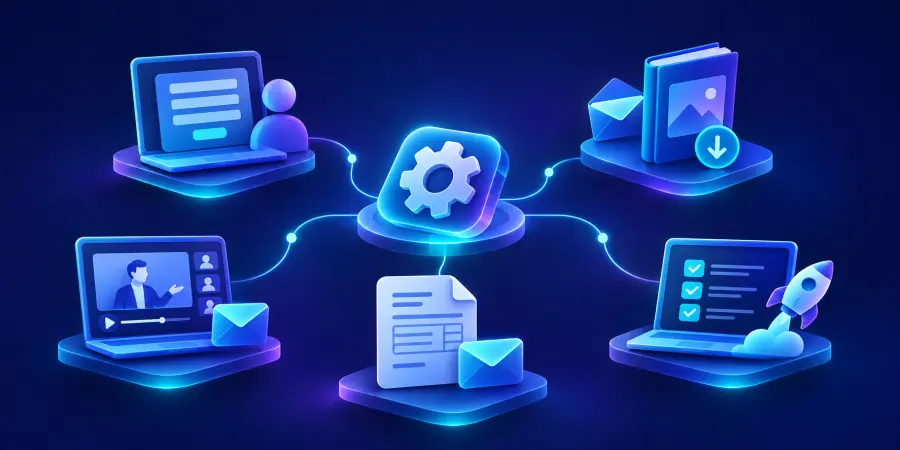
Useful marketing automation examples include routing a new inquiry, delivering a requested resource, following up after an event, coordinating a quote reminder and helping a new customer get started. Each needs a clear trigger, relevant next action and explicit stop conditions.
The biggest mistake is to copy a sequence without understanding the customer’s situation. A reminder can be helpful before a meeting and irritating after the person has already attended it. These five examples explain both what the software can do and what your team must decide.
1. Route a new inquiry to the right person
Trigger and actions
A visitor submits a service inquiry on your website. The workflow checks whether the contact already exists, records the request and assigns an owner. It can acknowledge receipt with a realistic description of the next step. The internal notification should include the request and its context, rather than force the salesperson to search several systems.
Stop conditions and exceptions
A duplicate submission should not automatically create another opportunity. An existing customer may need a different owner. Missing routing information should go to a review queue, with responsibility assigned. Once a salesperson takes over, stop generic messages that would conflict with the conversation.
Measure how many eligible inquiries reach an acknowledged owner and how long that takes. If you need the underlying concepts first, read what marketing automation means. The main marketing automation guide helps you prioritize this workflow against other uses.
2. Deliver a resource and offer a relevant next step
Trigger and actions
Someone requests a checklist or guide. Deliver that specific resource and record the interest it indicates. If further communication is appropriate, offer a relevant next step rather than immediately treat the download as a sales-ready opportunity. A person researching a topic may be months away from a purchase.
Stop conditions and exceptions
A contact who already received the resource should not repeatedly enter the same sequence after refreshing a form. Unsubscribes and other suppression rules must be respected across connected systems. A reply asking a specific question should reach a person, not merely trigger the next scheduled message.
Track resource delivery, useful engagement and qualified follow-up separately. Do not mistake an email open for a clear buying signal. Review the meaning and limitations of the events your platform reports before using them to make routing decisions.
3. Follow up after an event without treating everyone alike
Trigger and actions
After a webinar or workshop, attendance data can determine which message is useful. Attendees might receive the promised material and a related question. People who registered but did not attend may need a recording or another opportunity. Sales should see relevant context when someone explicitly asks for help.
Stop conditions and exceptions
Check whether attendance data arrives late or changes after import. A delayed update should not cause contradictory messages. Define how a person registered under two addresses is handled, and verify links before activation. Our tool selection guide explains why the actual event integration matters more than an integration logo.
Here is an illustrative audience split: 100 registrations, 60 attendees and 40 non-attendees. The percentages determine two appropriate routes; they do not represent a benchmark attendance rate or a predicted commercial outcome.
60%illustrative attendees40%illustrative non-attendees
4. Coordinate quote follow-up with the salesperson
Trigger and actions
A quote is sent and recorded in the CRM. The workflow can schedule an internal reminder or a carefully timed customer message if there has been no response. The message should make the next step easy: ask a specific question, offer clarification or provide a booking link when appropriate.
Stop conditions and exceptions
A reply, accepted quote, rejection or active negotiation should change the sequence. If a salesperson updates a record late, the system needs to account for the possibility that a conversation already happened. A fixed reminder schedule is risky when it ignores the person handling the opportunity.
Before launch, use the implementation checklist to test late replies and status changes. Measure useful responses and accepted proposals with clear denominators. A larger reply count can include complaints, so inspect the substance rather than celebrate the total.
5. Help a new customer complete the next step
Trigger and actions
A signed agreement or confirmed purchase starts an onboarding journey. Send the relevant welcome information, request only the details needed and assign internal preparation tasks. If a customer has already completed a step, the next message should recognize that progress instead of repeat the original request.
Stop conditions and exceptions
A cancellation, changed start date or unresolved service issue should alter the journey. Make it easy for the account owner to pause automation while handling an exception. The workflow should support a relationship, not insist on completing a checklist regardless of what the customer says.
An illustrative capacity calculation makes the potential benefit concrete: 30 new customers each month multiplied by eight minutes of administrative work removed equals 240 minutes, or four gross hours. Monitoring, corrections and maintenance reduce the net amount. This is an example calculation, not a Dopweb performance claim.
30new customers in the example8 minadministration removed each4 hrsillustrative gross capacity
How do you choose between these examples?
Score the problem by frequency, impact and clarity. A frequent handoff with explicit rules is easier to automate safely than a rare decision requiring extensive judgment. Ask the staff doing the work where records get lost and which repetitive steps they would gladly stop doing. Confirm that customers benefit too.
Choose one outcome, not several loosely related goals. A resource journey should not be evaluated solely by immediate sales, while a quote follow-up should not be judged only by email delivery. Name the owner of each metric and agree how long the team will observe results before changing the workflow.
Where can AI improve these workflows?
AI can summarize a free-text inquiry or suggest a category, but it is not necessary to recognize a confirmed booking. Use it where interpretation adds value. Limit the data passed to the model, test uncertain examples and specify when the result goes to a human. Measure usage and quality together; reducing tokens is not useful if the answer becomes unreliable.
For US commercial email, consult the FTC’s official CAN-SPAM guidance and review the requirements relevant to your workflow. Each additional channel can introduce different obligations.
How Dopweb turns an example into your workflow
Dopweb’s AI Agents & Workflow Automation service adapts the process to your tools, data and operating rules. We can build the integrations, test exceptional paths and help your team monitor the result. Company ownership and access arrangements should be clear from the beginning.
The handover matters as much as the build. Our training approach for business teams explains how operators learn to inspect records, pause sequences and request changes. As your services evolve, we can help add new workflows or improve the existing ones without losing sight of the original customer outcome.
Turn complex replies into a review queue
Some quote replies ask for clarification rather than signaling a lost sale. Define a queue and give the rep the original reply, quote, and proposed next step. See agentic AI use cases for lead qualification and workflow examples for designing the handoff.
About the author — Patrick Chemoul, CEO of Dopweb
Patrick Chemoul leads Dopweb, an agency helping businesses with websites, custom software and workflow automation. The agency also provides AI agent integration and team training. Learn more about Dopweb.
Frequently asked questions
Which example is best for a first project?
A repeated inquiry handoff is often a practical candidate because the trigger, owner and outcome can be defined clearly. Choose based on your actual workload and available data rather than copy another company’s sequence.
Can these workflows run without AI?
Yes. Clear events, field checks and stop rules can use deterministic automation. Add AI only where interpreting unstructured information is useful, with evaluation and a human fallback for uncertain results.
Should every contact receive the same follow-up?
No. Messages should reflect the person’s request, current status and applicable communication rules. An existing customer, an event attendee and someone negotiating a quote may need different routes or no automated message at all.
Are the numbers in these examples typical results?
No. They are explicit illustrations to show how to calculate audience splits and gross time savings. Measure your own baseline, exceptions and maintenance effort before estimating the benefit for your business.
Let’s talk about your project
Tell us where your team loses time and which tools you already use. We will help you scope a practical first marketing automation project.