
Types of Workflows: Sequential, Parallel, and Conditional
The right workflow structure removes unnecessary waiting while keeping important decisions under control. Here is how the main types fit real business processes.
Patrick Chemoul, CEO of Dopweb
Updated November 5, 2026
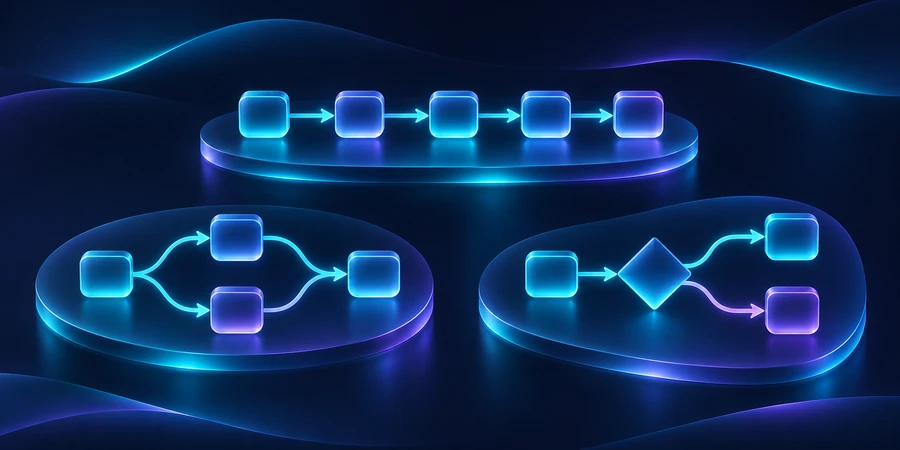
Types of workflows describe how tasks are ordered, how decisions change the path, and how much work software performs. Sequential, parallel, and conditional workflows describe structure. Manual and automated describe execution. These categories can overlap; there is no single universal list covering every business use.
That distinction helps when a process feels slow. You may not need a faster application. You may need to stop making independent reviews wait for one another, or make the rule for moving forward explicit.
Why do different sources list different workflow types?
Some classifications focus on the work being managed, such as business processes or robotic automation. Others describe the order of tasks or the amount of human involvement. They answer different questions rather than necessarily contradicting one another.
For implementation, separate three decisions: what must happen first, what determines the next route, and who or what performs each task. If the basic terminology is unclear, start with what a workflow is. A clear description is more useful than forcing your process into a category name.
What is a sequential workflow?
In a sequential workflow, steps happen in a required order. Each stage produces something the next stage needs. A request is checked, then approved, then prepared for execution. The dependency is what makes the order necessary.
When does a sequence make sense?
A contract must be approved before restricted access is granted. A delivery must be checked before its receiving record is closed. These dependencies protect the outcome. A procurement workflow commonly combines several such checkpoints.
What can go wrong?
Teams sometimes make independent tasks sequential out of habit. If two reviewers already have everything they need, waiting for the first review before requesting the second may add delay without improving control. Also define a substitute owner when the usual reviewer is unavailable.
What is a parallel workflow?
A parallel workflow lets independent activities proceed at the same time. The branches later meet at a defined checkpoint. During client onboarding, workspace preparation and an administrative review may be able to run together.
Specify the joining rule. Does the process need all approvals, any one response, or a particular combination? Also define what happens if a branch is rejected or no longer relevant. Completing one branch does not automatically mean the whole item is complete.
Illustrative timing comparison: two independent checks take 30 minutes and 20 minutes, with no additional waiting.50 minwhen performed sequentially30 minwhen started together40%theoretical reduction in this segment
The example saves 20 minutes out of 50. It assumes the checks can actually run independently and resources are available. If the same person must perform both, the proposed parallel execution may not be feasible.
What is a conditional workflow?
A conditional workflow chooses a route based on explicit criteria. Complete requests proceed; incomplete requests return for clarification. A particular category may require a specialist review. Conditions should be testable and their priority should be documented.
Include a safe default route
A new field value or an unexpected response should not make a request disappear. Route unrecognized cases to a review queue with an owner. Test empty fields, conflicting values, and changes made after processing has started.
Keep branches understandable
Every new exception creates another path to test. Group similar rules and name the branches in business language. A visual canvas can become difficult to maintain when nobody can explain why a request follows a particular route.
How do manual and automated workflows differ?
Manual workflows rely on people to perform the steps and move information forward. Automated workflows let software execute defined operations. Hybrid workflows place human decisions between automated segments, often providing a practical balance.
A team's first improvement may be automated preparation and routing rather than automated decision-making. Our workflow automation guide explains how to pilot that change without losing visibility or a manual fallback.
Illustrative design: a workflow contains 8 steps, with software executing 6 and people approving 2.8defined steps75%of steps automated2human approval points
This counts steps, not time saved. One approval could take longer than all six automated actions combined. Use the diagram to clarify responsibility, then measure handling time, waiting time, and errors separately.
How do case workflows and AI fit in?
Some requests develop as new information becomes available. A complex support issue may require extra documents, another specialist, or several exchanges. A case-oriented approach manages the item's state and responsibilities without assuming every task can be predicted in advance.
AI can help interpret messages or suggest a next step, but it does not remove the need for permissions. Decide which actions the system may prepare and which it may execute. A confident answer from a model is not the same as an authorized business decision.
Keep deterministic rules for checks that have a clear answer. Use AI where interpretation adds value, and define how uncertain outputs are reviewed. The workflow examples guide shows how these choices differ across intake, support, reporting, and purchasing.
How should you choose a workflow structure?
Identify real dependencies
For every step, ask what information must exist before it can begin. If nothing is missing, consider whether it can run alongside another step. If the route depends on a category or decision, make that condition explicit.
Examine exceptions before choosing software
Review incomplete, canceled, rejected, and reopened requests. A stable process supports tightly defined automation. A process that changes with each case needs more flexibility and human supervision. The exceptions often determine the architecture more than the normal case does.
Match the software to the controls
Our workflow automation tools comparison covers branches, approvals, integrations, and recovery. A product's connector list does not prove it can execute your entire process with the controls you require.
Microsoft's Power Automate approvals documentation provides a useful example of why approval behavior matters: waiting for every approver differs from accepting the first response. Choose the behavior that matches your organization's decision rule.
How can Dopweb help design the right workflow?
Through our AI Agents & Workflow Automation service, we can map dependencies with your team, build the required routes, connect applications, and test what happens when a request does not follow the usual path.
The deliverable should include understandable rules, monitoring, and a way to change the process safely. When AI is involved, we define its scope and evaluate outputs alongside consumption. As new cases appear, we can update the branches, documentation, and tests together.
Combine workflow types in one purchase request
Check that the request is complete before forwarding it. Then let purchasing and the technical owner review in parallel if their checks are independent. A spending threshold can trigger another approval. Define what happens if a reviewer rejects the request, responds late, or approves a version that changes afterward. The first approval should not trigger an order if a second approval is required.
Apply the same logic when implementing marketing automation, where a reply can cancel a queued message. See AI agent oversight for branches that involve a proposed action.
About the author — Patrick Chemoul, CEO of Dopweb
Patrick Chemoul leads Dopweb, an agency helping businesses with websites, software, and automation. The agency also provides AI agent integration and team training. Learn about Dopweb.
Frequently Asked Questions
Can a workflow be both parallel and automated?
Yes. Parallel describes the relationship between steps, while automated describes how they run. Several software actions can proceed independently and then wait at a shared checkpoint.
What is the simplest workflow type?
A short sequential workflow is often easiest to describe, but it is not always the best design. Use it when later steps genuinely depend on earlier results.
Which workflow type is best for approvals?
Sequential approval fits dependent reviews. Parallel approval fits independent reviews. In either case, define rejection, absence, escalation, and the rule for collecting responses.
Does an AI agent make a workflow autonomous?
Only within its configured permissions and controls. An agent can be allowed to recommend an action without being allowed to execute it. Define those boundaries explicitly.
Let’s Talk About Your Workflow
Tell us which process slows your team down. We can help define a practical first workflow, the systems it needs to connect, and the controls that will make it dependable.